








Met trots willen we laten weten dat er nu nieuwe firmware voor de Float Pro beschikbaar is! Versie 1.1 bevat een belangrijke bugfix en twee nieuwe functies om je brouwervaring te verbeteren:
- Correcte verwerking van negatieve temperatuurmetingen
- Een setup-modus in jouw voorkeurstaal:

- Automatische opslag van metingen, ook wanneer er geen Wi-Fi beschikbaar is
Lees verder voor meer informatie over deze verbeteringen en hoe je de update installeert!
🗣Float Pro setup-interface in jouw taal
Wanneer je de Float Pro in de SETUP-MODUS zet, maakt hij zijn eigen Wi-Fi-netwerk aan. Meer informatie over de setup-modus vind je in de handleiding📖.
Zodra het netwerk beschikbaar is, maak je eenvoudig verbinding met je mobiele apparaat. Na het verbinden word je automatisch doorgestuurd naar het installatievenster van de Float Pro.
Daar kun je je voorkeurstaal selecteren.🌎
💾Metingen opslaan – maximale databeschikbaarheid
Naast de taalverbeteringen slaat de Float Pro metingen nu lokaal op wanneer er geen Wi-Fi beschikbaar is. Zo kun je je gisting blijven bewaken zonder je zorgen te maken over tijdelijke verbindingsproblemen.
Als je Wi-Fi-verbinding bijvoorbeeld wordt onderbroken (wie vertrouwt Wi-Fi nou volledig?), blijft de Float Pro metingen opnemen. Zodra hij weer verbinding maakt met het netwerk, worden alle opgeslagen gegevens automatisch naar het platform geüpload.
Daarnaast hebben we een efficiënte opslagstrategie ontwikkeld waarmee de Float Pro tot 170 dagen aan gegevens kan bewaren.
💡Hoe haal je het meeste uit deze functie
Houd de volgende aanbevelingen in gedachten voor optimale prestaties:
- 🔋Zorg ervoor dat de Float Pro volledig opgeladen is voordat je een gisting start.
Dit helpt om de tijd correct bij te houden en zorgt ervoor dat je Float Pro de volledige gisting opslaat. - 🛠️Maak een gisting aan op het myBrewbrain-platform om metingen van elkaar te onderscheiden.
- 🚀Zorg ervoor dat je gegevens naar het platform stuurt voordat je de Float Pro oplaadt of uitzet: dit zorgt voor een correcte tijdregistratie.
Veel plezier met brouwen! 🍻
🔄Hoe update ik mijn Float Pro?
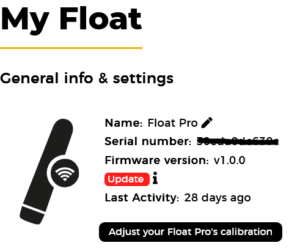
Om versie 1.1 te installeren, ga naar het myBrewbrain platform, selecteer je Float Pro en klik op de knop ‘Update’.
De Float Pro installeert de update automatisch de volgende keer dat hij verbinding maakt met het platform.
Als je de update direct wilt starten, houd dan de dop van de Float Pro omhoog.
Zoals altijd helpt je feedback ons om te verbeteren. Als je vragen, suggesties of opmerkingen hebt, laat het ons weten.
Proost🍺
Thijs